Wanting to track filament usage is usually triggered by the same event: a print fails at 90% because the spool you thought had plenty left didn't. The goal is simple — know how many grams each print used, and how many grams each spool has left — but most of the common solutions bolt a server or a spreadsheet onto that simple goal.
The options, honestly compared
- Slicer statistics. Your slicer reports estimated grams per print — that's the data source everything else uses. But the slicer doesn't know which physical spool you loaded, and its totals reset with each project. It's a per-print number, not an inventory.
- OctoPrint / Klipper plugins. Filament-manager plugins deduct usage automatically, which is great — if you run OctoPrint or Klipper, on every printer, and your printers are the only place filament gets used. Bambu, closed-firmware and offline printers are out.
- Spoolman. The most capable option, and the standard for self-hosters — but it's a server you install, maintain, and integrate with your printer stack. We wrote a full comparison.
- A spreadsheet. The forum-thread answer. Works for a week, then one unlogged print makes every number after it wrong, and there's no phone-friendly way to check the shelf from the printer.
Notice what all the automatic options share: they track the printer. If the printer didn't see the filament move, it doesn't exist. Multi-printer households, resin-and-FDM mixes, and anyone with a Bambu fall through the cracks.
Track spools, not printers
The alternative is to make the spool the unit of tracking, which is what SpoolVault does:
- Add your spools once — pick a brand and type, tap every color you own, and save them all at once. Empty spool weights come preloaded, so this takes minutes, not an evening.
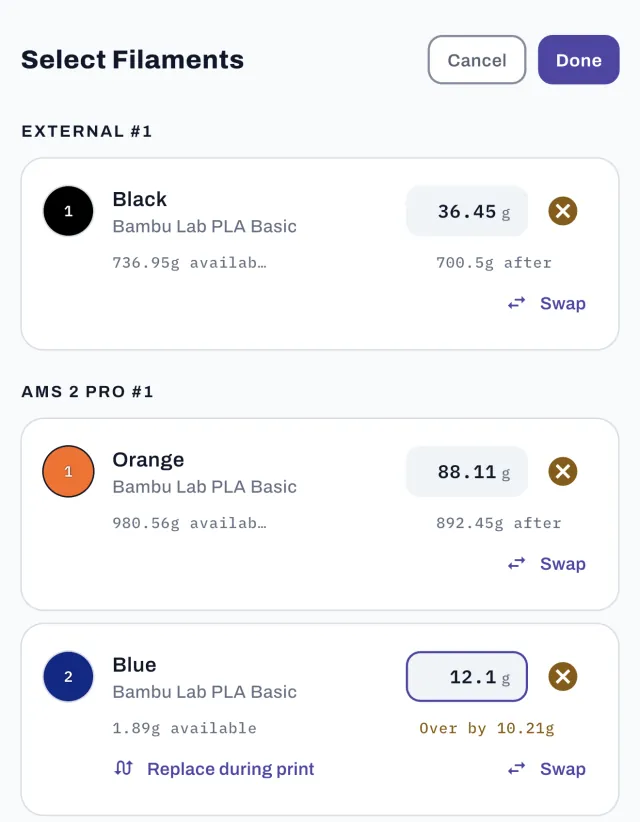
- After each print, log the grams used per spool. The number comes straight from your slicer's print summary; multi-material prints report per-filament grams. Every spool's remaining weight updates straight away.
- Re-weigh occasionally. Because remaining weight is anchored to real weigh-ins (see how much filament is left), drift never accumulates the way estimate-only systems do.
Because nothing talks to the printer, it works with every printer — Bambu, Prusa, Creality, Voron, the resin machine's FDM neighbor — and with the spools sitting sealed on the shelf, which no printer-side tracker even knows about.
What a running log gets you
- "Can I finish this print?" answered before you start — needed vs. available grams, per spool.
- Usage over time — how much filament you've burned this month, and which materials go fastest, straight from print history.
- Real costs — with purchase prices on your spools, every logged print gets a material cost automatically. More in the cost-per-print guide.
- Smarter restocking — you buy the colors you actually use, not the ones you fear running out of.
Start your usage log tonight
SpoolVault is a filament tracker for iPhone, iPad and Android — no server, no spreadsheet, works with any printer.


 On a computer?
Scan with your
phone camera.
Free for 30 days — no subscription starts · iOS 15+ & Android 7+