Every guide on how to organize 3D printer filament covers the same half of the problem: dry boxes, silica gel, IKEA shelves. All good advice — and none of it answers the question you actually ask mid-project: do I own a spool of black PETG, how much is on it, and which box is it in? Organization has a physical layer and an information layer, and you need both.
The physical layer, briefly
The short version of every storage guide, so we can get to the part they skip:
- Keep it dry. PLA tolerates room air for a while; PETG, Nylon and TPU absorb moisture and print visibly worse. Sealed boxes or cereal-style containers with silica gel cover most people. Vacuum bags for the archive shelf.
- Keep sealed stock sealed. An unopened spool in its factory bag is the easiest spool to store — don't open filament you're not about to print.
- Label locations, not just spools. "Box C, garage shelf" on the container beats re-reading twenty spool labels. Whatever scheme you pick, keep it boring and consistent.
- Dry before printing if in doubt. A filament dryer (or low oven, carefully) rescues damp spools; organization just tells you which ones went in first.
The information layer: your filament catalog
Storage keeps filament printable. A catalog keeps it findable — and makes the whole stash queryable from your phone while you're standing at the printer or in the filament aisle. A good catalog answers four questions instantly:
- What do I own? Every spool, by brand, material and color — opened and unopened.
- Where is it? Which printer or AMS slot it's loaded in, or which box it's stored in.
- How much is left? Grams remaining per spool, from real weigh-ins (see how much filament is left).
- What's running low? So restocking happens before the 3am mid-print surprise, not after.
Spreadsheet or app?
A spreadsheet can hold all four answers — plenty of makers start there, and templates float around every forum. The failure mode is friction: the sheet lives on a computer, updating it after each print is a chore, and one skipped update quietly poisons every number below it. If the spreadsheet is working for you, keep it. If you've abandoned two of them already, the fix is a tool that makes the update a ten-second phone action.
SpoolVault is that tool — a filament catalog built for the way makers actually work:
- Organize by printer, AMS slot and storage location — the app mirrors your physical setup, whatever it looks like.
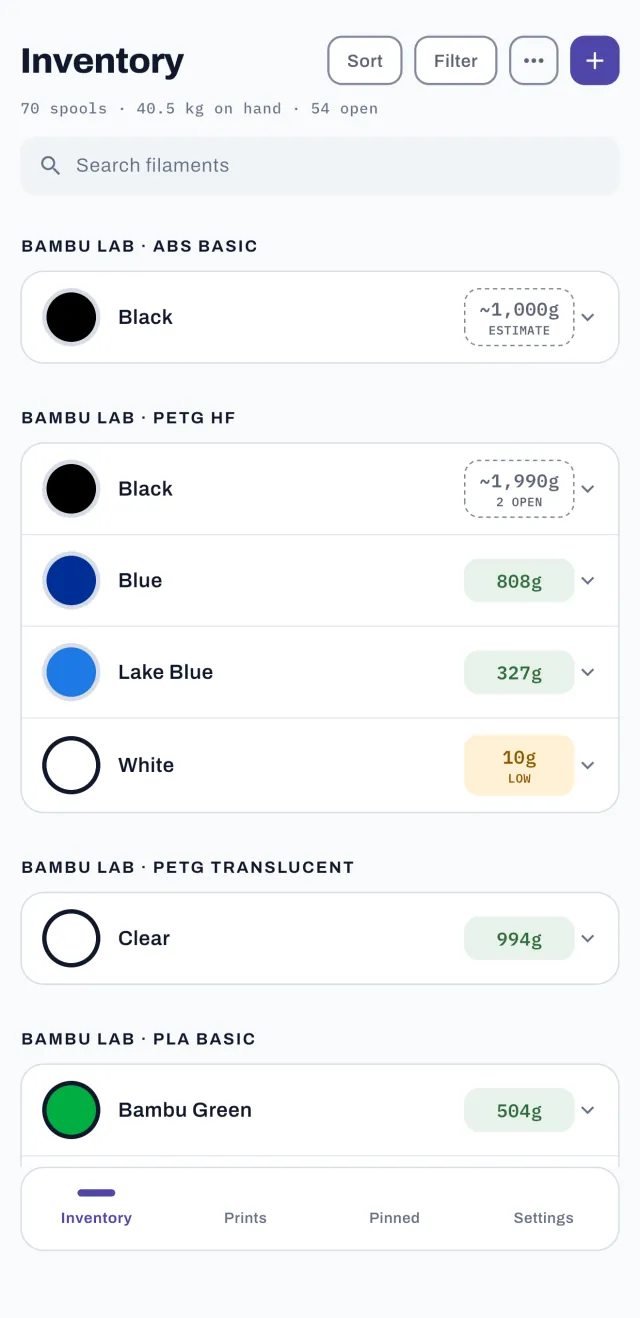
- Search, sort and filter by material, color or remaining weight. "Black PETG, most filament first" is one filter away.
- Opened and unopened spools tracked separately, so spare stock and the spools you're printing from never blur together.
- Preloaded brand catalogs — Bambu Lab, eSUN, Polymaker, Hatchbox, Overture, Sunlu and more — let you pick a brand and type, tap every color you own, and add them all at once.
A system that survives contact with real life
The organization systems that fail are the ones that demand discipline at print time. The ones that stick have exactly two habits: log the print when it finishes (ten seconds — see tracking filament usage), and update the location when a spool moves. Everything else — remaining weights, low-stock awareness, print costs — falls out automatically.
The information layer, in your pocket
SpoolVault keeps your whole filament collection searchable, located and weighed — in your pocket.


 On a computer?
Scan with your
phone camera.
Free for 30 days — no subscription starts · iOS 15+ & Android 7+